MCB
MCB
Mobile app
Mobile app
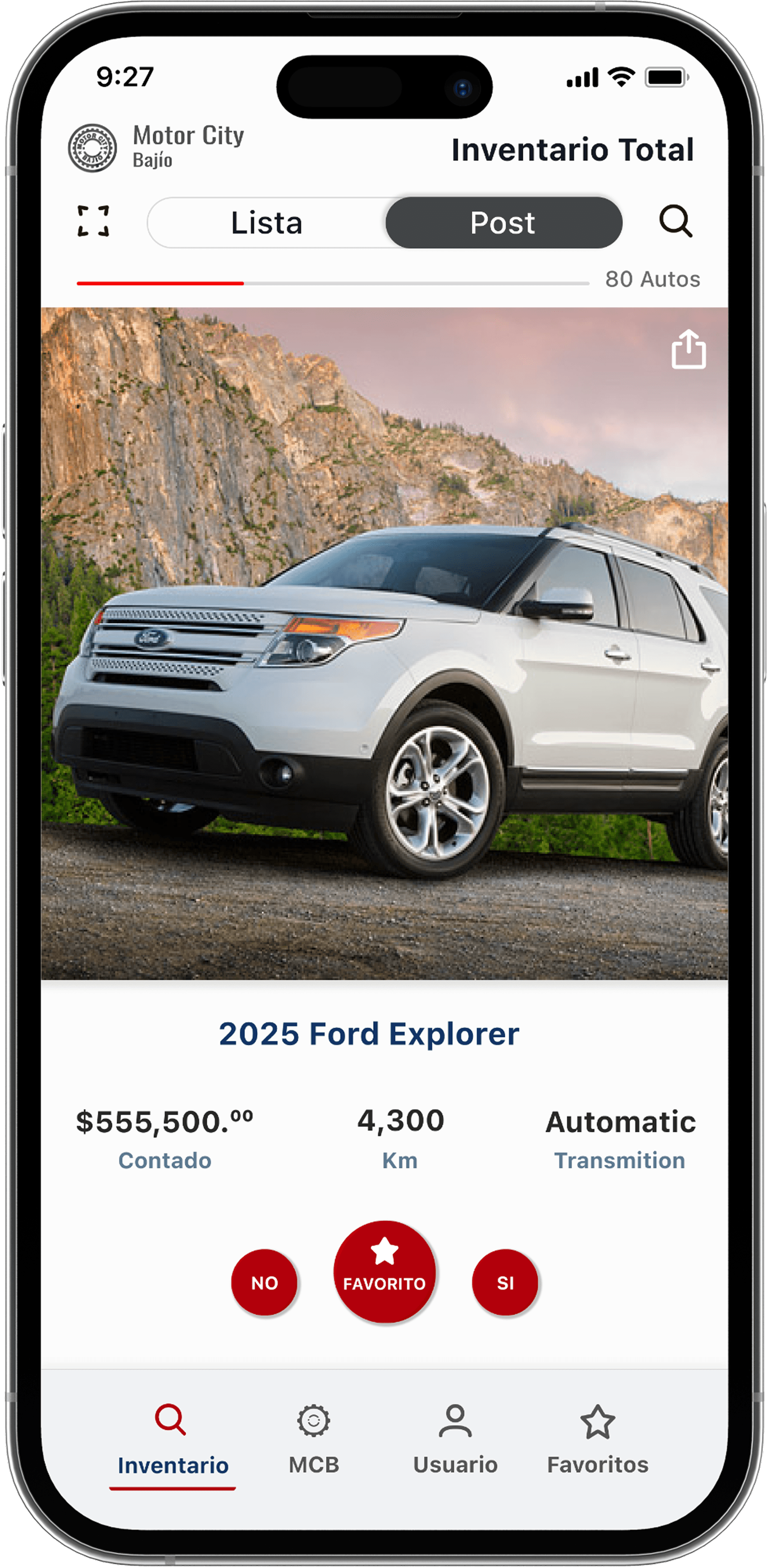
Mobile app designed to showcase car inventory and help users efficiently sort vehicles through swipe-based or list-focused browsing, supporting stronger engagement and more informed decision-making.
Mobile app designed to showcase car inventory and help users efficiently sort vehicles through swipe-based or list-focused browsing, supporting stronger engagement and more informed decision-making.
Mobile app designed to showcase car inventory and help users efficiently sort vehicles through swipe-based or list-focused browsing, supporting stronger engagement and more informed decision-making.
1st release
Mexican market
1st release
Mexican market
keywords' translation
keywords' translation
Client & sector
Client & sector
Motor City Bajio (MCB) - an automotive retail company for the Bajio area in the Mexican market
Motor City Bajio (MCB) - an automotive retail company for the Bajio area in the Mexican market
Motor City Bajio (MCB) - an automotive retail company for the Bajio area in the Mexican market
Collaborators
Collaborators
CEO
Developer team
Marketing team
CEO
Developer team
Marketing team
Role
Role
UX design Lead
UX design Lead
Page summary
⏱ 45 sec read
⏱ 3 min read
⏱ 45 sec read
OVERVIEW
Impact & outcomes
User

Users can sort and compare cars faster than the old PDF system, boosting decision-making efficiency.
Users can sort and compare cars faster than the old PDF system, boosting decision-making efficiency.

Personalization features, like saved cars, significantly increased session engagement.
Personalization features, like saved cars, significantly increased session engagement.
Enhanced information clarity and CTA effectiveness through user-centered design.
Enhanced information clarity and CTA effectiveness through user-centered design.
Client / Business
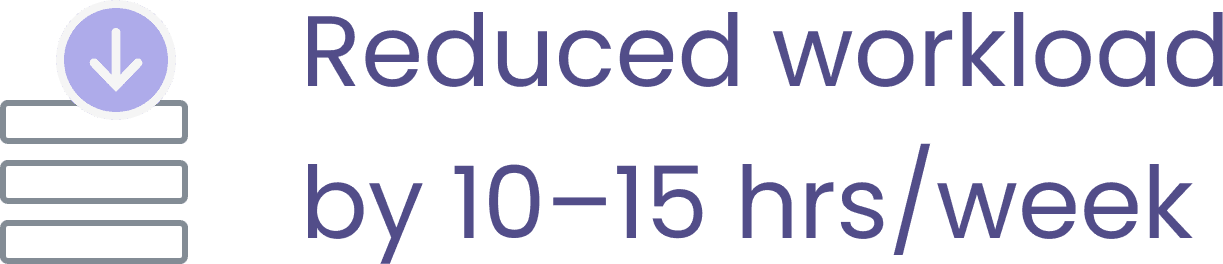
Reduced weekly user support by introducing digital inventory access and self-serve browsing.
Reduced weekly user support by introducing digital inventory access and self-serve browsing.

Return visits increase sales opportunities, strengthen user loyalty, and inform product decisions.
Return visits increase sales opportunities, strengthen user loyalty, and inform product decisions.

Higher engagement, return visits, and faster sorting are expected to increase MCB’s monthly revenue.
Higher engagement, return visits, and faster sorting are expected to increase MCB’s monthly revenue.
Product highlights
3.5x Faster sorting times
3.5x Faster sorting times
With this sorting system, users navigate the car inventory significantly faster than the company's prior approach.
Increased user engagement & satisfaction
Increased user engagement & satisfaction
Increased user engagement & satisfaction
Users can create customized lists of favorite, intriguing, and undesired cars, elevating satisfaction, confidence, and engagement during the car selection process.
Users can create customized lists of favorite, intriguing, and undesired cars, elevating satisfaction, confidence, and engagement during the car selection process.
Flexible vehicle browsing
Flexible vehicle browsing
Improved usability across age groups and tech literacy levels by incorporating a dual-view sorting system
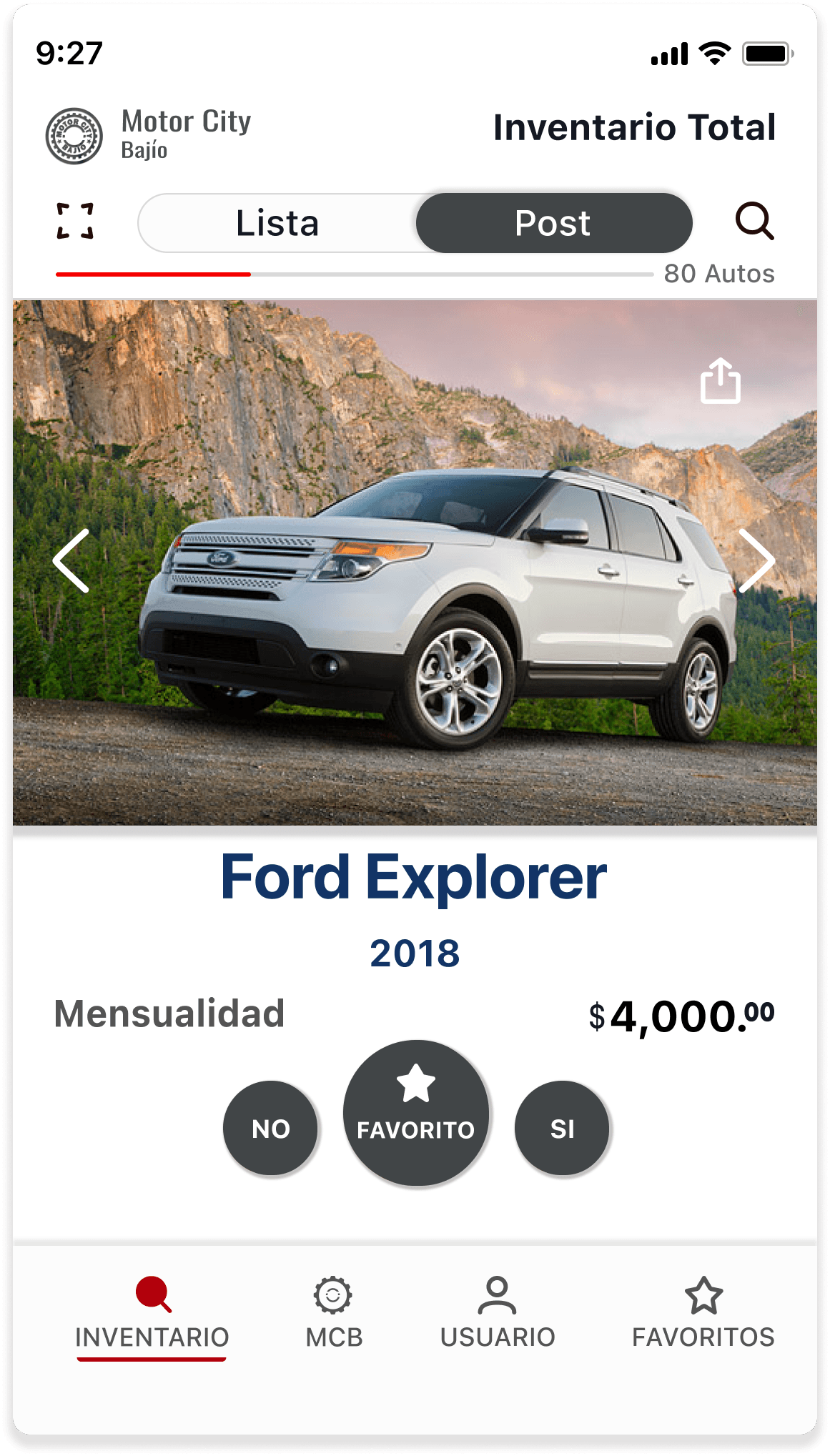
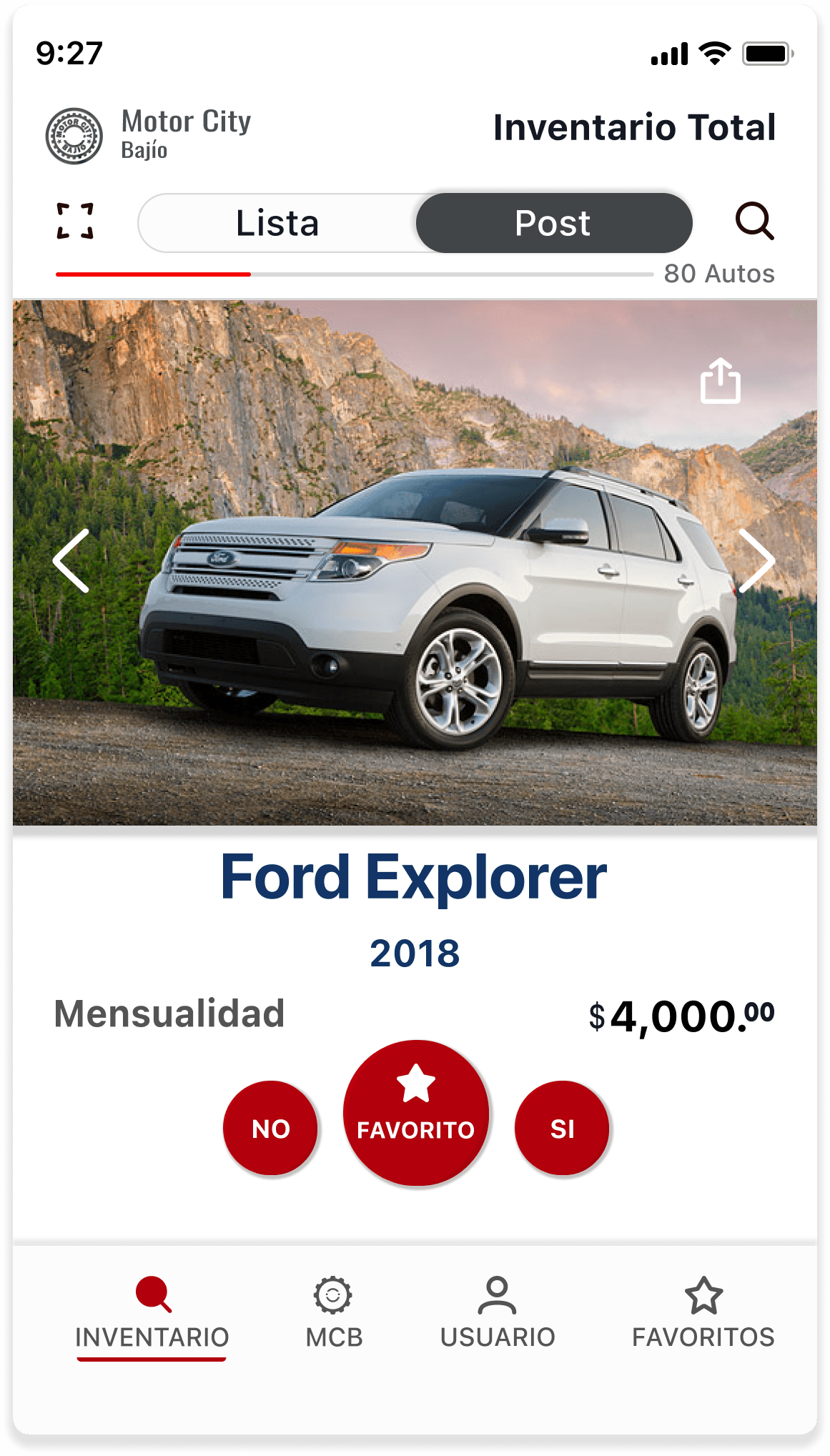
Post View: Featuring fast sorting buttons designed for modern buyers.
List View: Offering a list format with sorting options tailored to traditional buyers.
CASE STUDY
Discovery
The user
Primary Users: Potential car buyers in the Mexican market exploring vehicles and evaluating options.
Our client
Motor City Bajío is a Mexican car dealership offering sales, financing, and insurance.
Understanding the problem and approach
Motor City Bajío, a Mexican car dealership, aimed to modernize its car inventory showcase by replacing the outdated PDF download system, where users had to go online and manually download the current inventory.
Problem
Users experience long and inefficient car-sorting times due to the reliance on a PDF-based inventory system
Users disengage during the car-sorting process due to long reading times and the lack of visual car imagery in a PDF-based inventory system
Goals
Offer users three intuitive sorting systems that reduce car-sorting time and remain accessible and user-friendly for a broad range of user types
Enhance user engagement by providing clear, visual, and relevant information that users need to confidently evaluate and sort vehicles
PRODUCT - Transformation
Based on a research-driven project, the company transitioned from a non-engaging, inefficient sorting system to a user-centered experience that significantly speeds up car sorting and decision-making.
From a static web download PDF experience

to a dynamic swipe sorting system

Design process
From research to design
ALIGNMENT - Locating the meeting point for all stakeholders
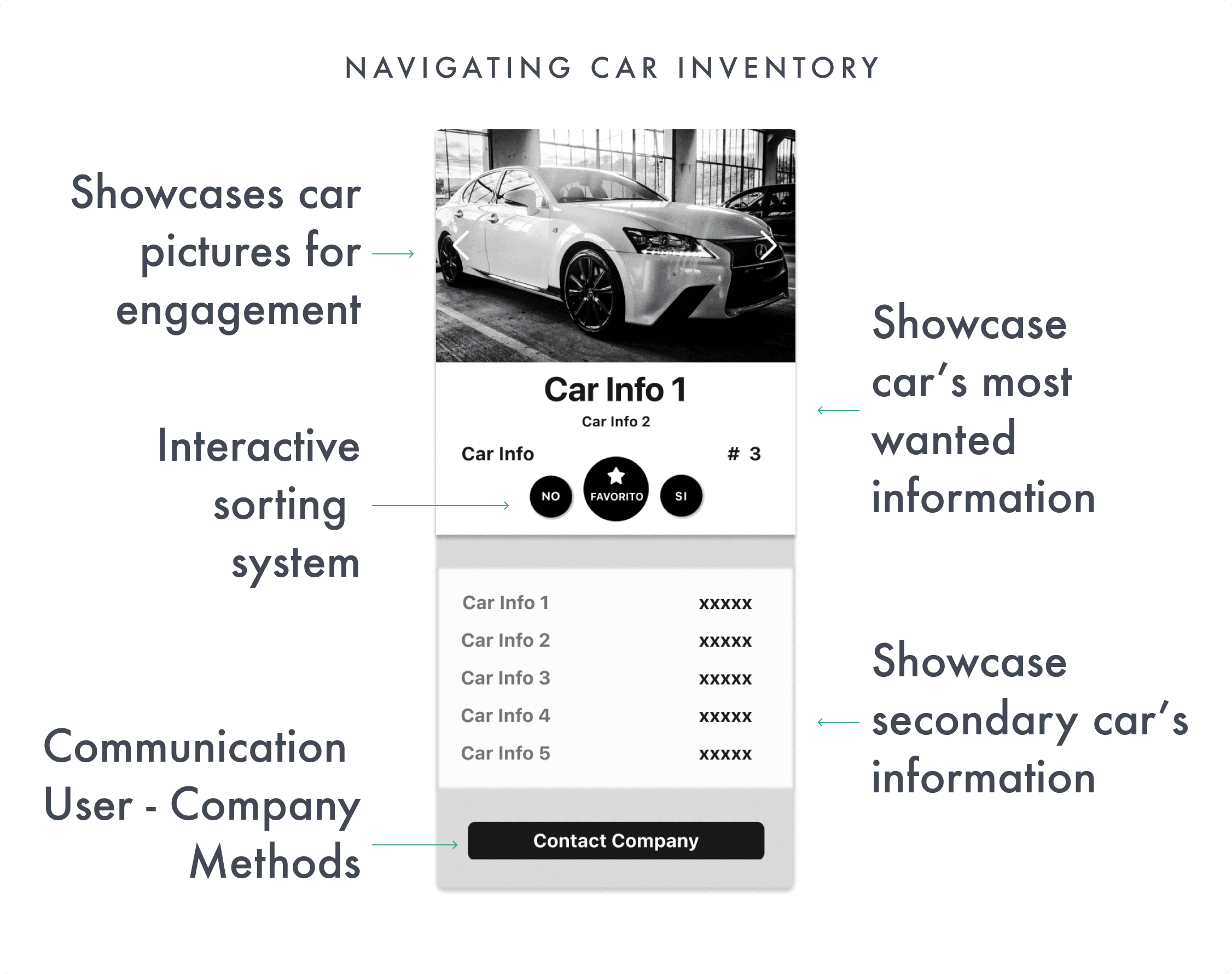
Based on the client’s needs and vision, along with insights from desk research, I designed the first solution proposal to align with the project goals.
ALIGNMENT - CTA Design
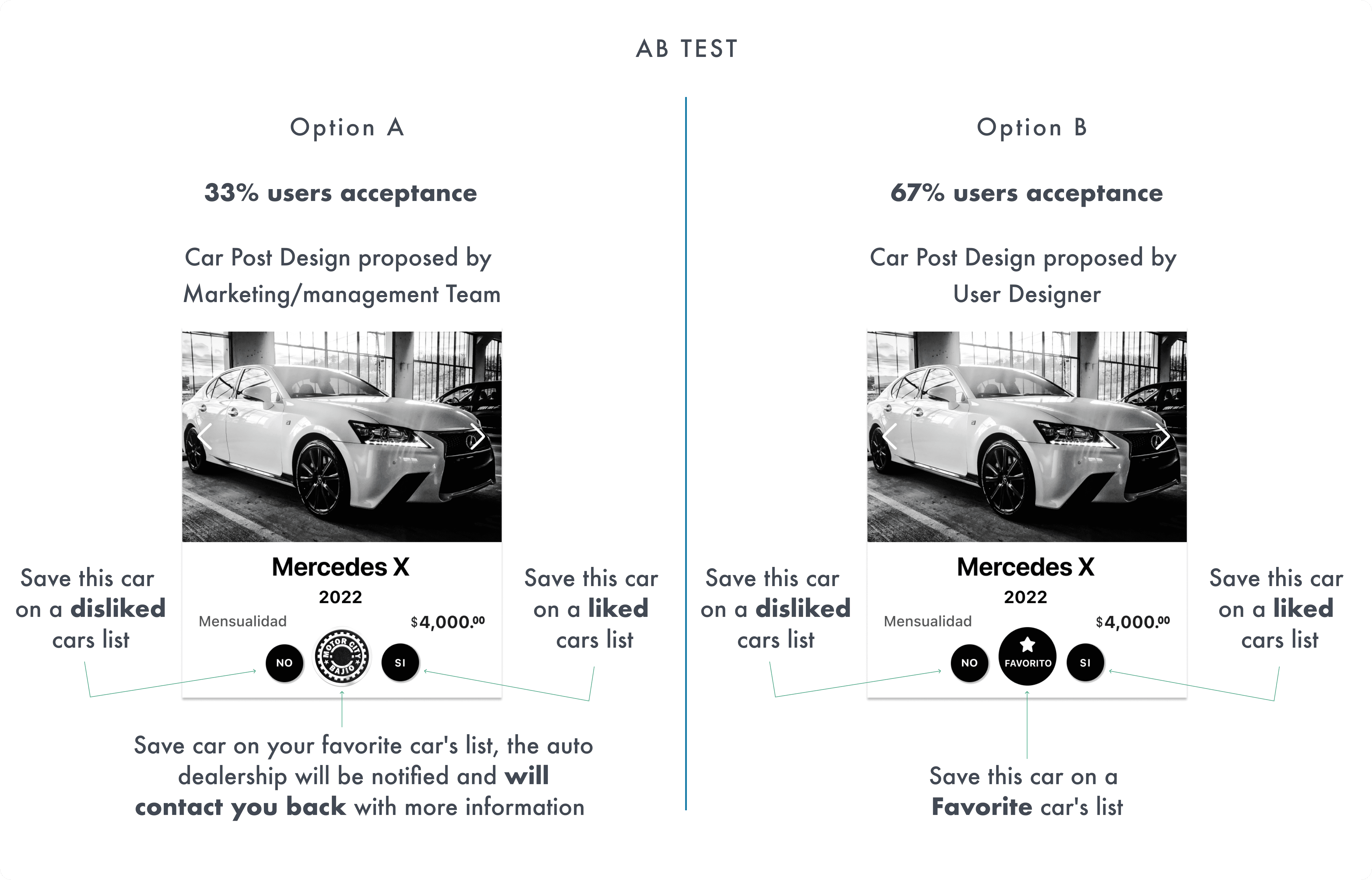
I conducted an A/B test with potential customers to evaluate the CTA and core car-sorting proposals from both management and the UX team. While the client and the marketing team preferred to include the logo in the CTA button, this approach conflicted with UX best practices. To validate user needs, I ran an A/B test, and Option B emerged as the most effective and preferred design.
DISCOVERY - Finding the potential users' most requested car information
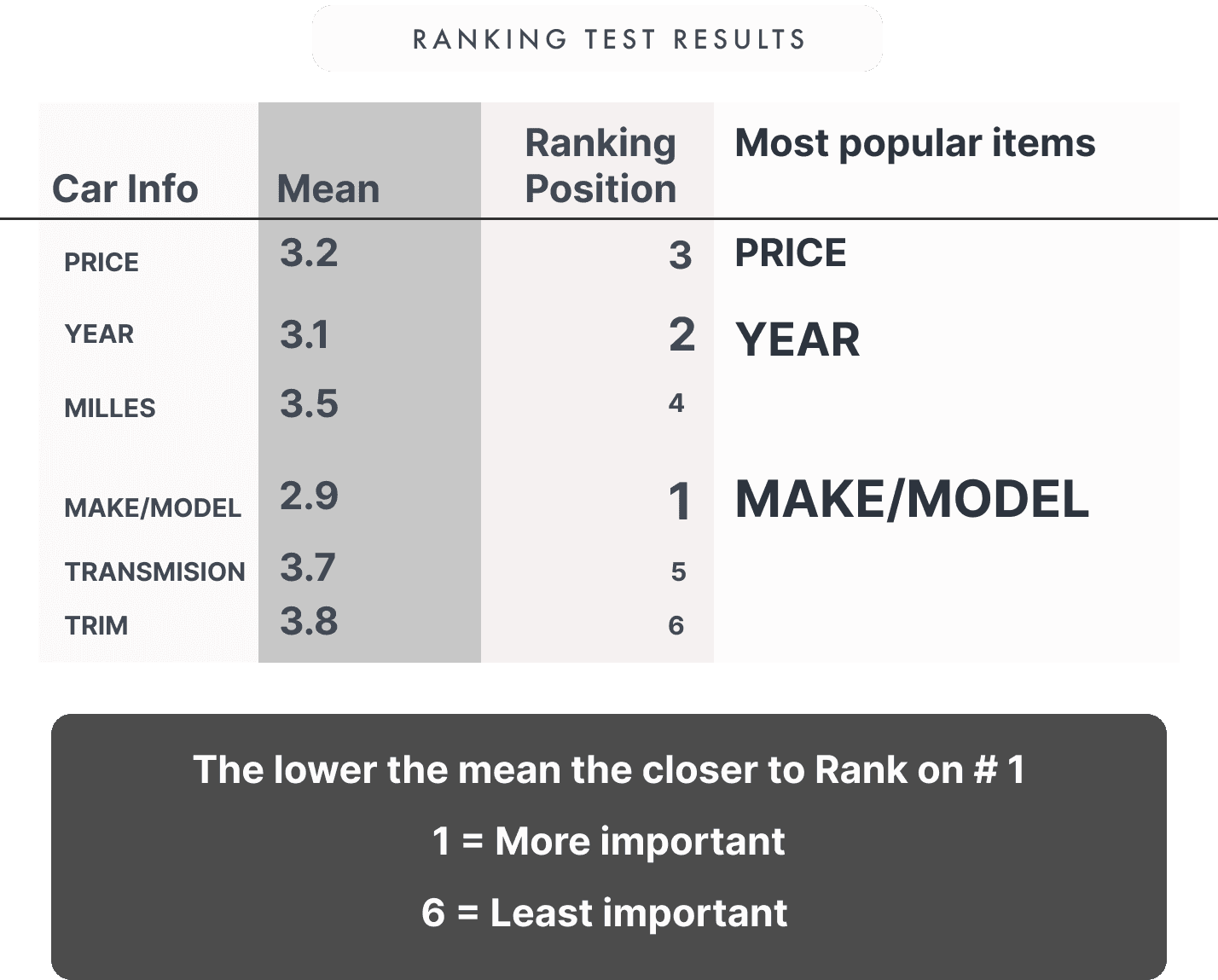
Recognizing the human brain’s limited capacity to process information, I conducted a ranking test to identify the most critical data users need when searching for a car to purchase. These insights informed the design of the car post, revealing that make/model, year, and price are the three primary focus areas for users.
DECISIONS - Nav tab
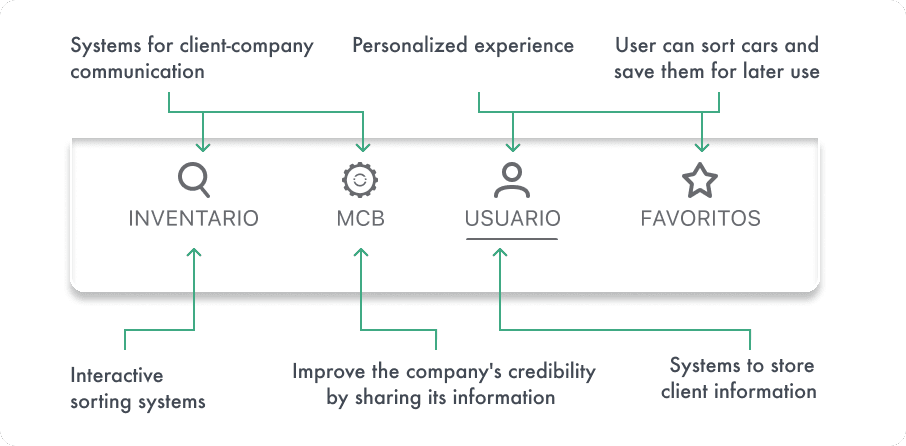
Informed by a comprehensive evaluation of user feedback and the company's specific requirements and requests, I designed a navigation tab that encapsulates all essential goals.
DESIGN - Ensuring consistent branding throughout the design
I developed the color palette by blending MCB marketing team insights and the company's webpage branding. This palette serves multiple purposes:
• Red maintains brand consistency across the webpage and MCB's social media platforms.
• Blue instills trust in users.
• White background: although different from the company's original webpage dark background although different from the original company's webpage's dark background, it adheres to AAA accessibility standards on the mobile app.
• Dark gray hues are strategically employed to enhance text contrast, aiding users in identifying vital information.

DECISIONS - Ensuring peak user engagement
The objective was to steer towards achieving the highest possible level of user engagement within the sorting experience, to achieve this, I conducted both A/B testing and a sentiment survey.
I implemented two distinct sorting button (CTA) styles, each with a unique direction:
Gray: A choice that exudes elegance.
Red: Aligned with branding for a more assertive and attention-grabbing appearance.
Gray Design
21% Acceptance
Red Design
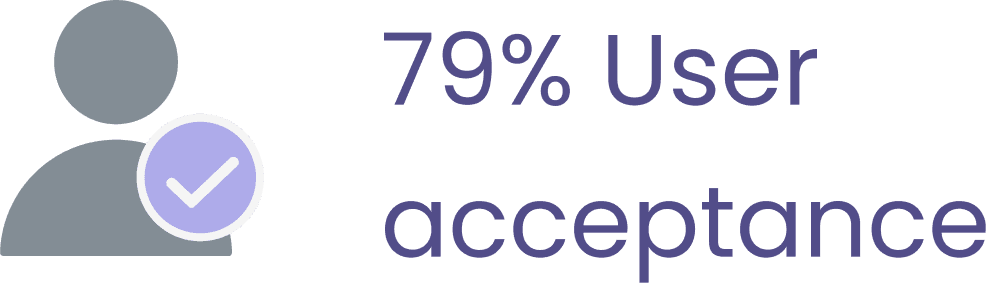
79% Acceptance
KEY CHALLENGES & LEARNINGS


The absence of similar apps in the market made defining user flows and designing intuitive car sorting patterns a challenge.
The UX team researched and analyzed sorting systems from other markets to inform intuitive, user-centered design solutions.
The client was located in central Mexico while the UX lead was in the US, creating challenges in coordinating user research and meetings.
All research and testing were conducted online with a coordinated schedule and strategic email communication to ensure smooth collaboration.
The client was located in central Mexico while the UX lead was in the US, creating challenges in coordinating user research and meetings.
All research and testing were conducted online with a coordinated schedule and strategic email communication to ensure smooth collaboration.
The client was located in central Mexico while the UX lead was in the US, creating challenges in coordinating user research and meetings.
All research and testing were conducted online with a coordinated schedule and strategic email communication to ensure smooth collaboration.
The client was located in central Mexico while the UX lead was in the US, creating challenges in coordinating user research and meetings.
All research and testing were conducted online with a coordinated schedule and strategic email communication to ensure smooth collaboration.
LEARNINGS
This project taught me how to align marketing goals, leadership vision, and user needs by grounding decisions in research. Presenting insights early helped gain stakeholder alignment, while building dynamic sorting systems highlighted the importance of validating ideas through user testing and additional research. The experience reinforced that innovation should always be backed by evidence to deliver both business impact and user value.
MCB
MCB
Mobile app
Mobile app
Mobile app designed to showcase car inventory and help users efficiently sort vehicles through swipe-based or list-focused browsing, supporting stronger engagement and more informed decision-making.
Mobile app designed to showcase car inventory and help users efficiently sort vehicles through swipe-based or list-focused browsing, supporting stronger engagement and more informed decision-making.
Mobile app designed to showcase car inventory and help users efficiently sort vehicles through swipe-based or list-focused browsing, supporting stronger engagement and more informed decision-making.
1st release
Mexican market
1st release
Mexican market
keywords' translation
keywords' translation
Client & sector
Client & sector
Motor City Bajio (MCB) - an automotive retail company for the Bajio area in the Mexican market
Motor City Bajio (MCB) - an automotive retail company for the Bajio area in the Mexican market
Motor City Bajio (MCB) - an automotive retail company for the Bajio area in the Mexican market
Collaborators
Collaborators
CEO
Developer team
Marketing team
CEO
Developer team
Marketing team
Role
Role
UX design Lead
UX design Lead
Page summary
⏱ 45 sec read
⏱ 3 min read
⏱ 45 sec read
OVERVIEW
Impact & outcomes
User
Users can sort and compare cars faster than the old PDF system, boosting decision-making efficiency.
Users can sort and compare cars faster than the old PDF system, boosting decision-making efficiency.
Personalization features, like saved cars, significantly increased session engagement.
Personalization features, like saved cars, significantly increased session engagement.
Enhanced information clarity and CTA effectiveness through user-centered design.
Enhanced information clarity and CTA effectiveness through user-centered design.
Client / Business
Reduced weekly user support by introducing digital inventory access and self-serve browsing.
Reduced weekly user support by introducing digital inventory access and self-serve browsing.
Return visits increase sales opportunities, strengthen user loyalty, and inform product decisions.
Return visits increase sales opportunities, strengthen user loyalty, and inform product decisions.
Higher engagement, return visits, and faster sorting are expected to increase MCB’s monthly revenue.
Higher engagement, return visits, and faster sorting are expected to increase MCB’s monthly revenue.
Product highlights
3.5x Faster sorting times
3.5x Faster sorting times
With this sorting system, users navigate the car inventory significantly faster than the company's prior approach.
Increased user engagement & satisfaction
Increased user engagement & satisfaction
Increased user engagement & satisfaction
Users can create customized lists of favorite, intriguing, and undesired cars, elevating satisfaction, confidence, and engagement during the car selection process.
Users can create customized lists of favorite, intriguing, and undesired cars, elevating satisfaction, confidence, and engagement during the car selection process.
Flexible vehicle browsing
Flexible vehicle browsing
Improved usability across age groups and tech literacy levels by incorporating a dual-view sorting system
Post View: Featuring fast sorting buttons designed for modern buyers.
List View: Offering a list format with sorting options tailored to traditional buyers.
CASE STUDY
Discovery
The user
Primary Users: Potential car buyers in the Mexican market exploring vehicles and evaluating options.
Our client
Motor City Bajío is a Mexican car dealership offering sales, financing, and insurance.
Understanding the problem and approach
Motor City Bajío, a Mexican car dealership, aimed to modernize its car inventory showcase by replacing the outdated PDF download system, where users had to go online and manually download the current inventory.
Problem
Users experience long and inefficient car-sorting times due to the reliance on a PDF-based inventory system
Users disengage during the car-sorting process due to long reading times and the lack of visual car imagery in a PDF-based inventory system
Goals
Offer users three intuitive sorting systems that reduce car-sorting time and remain accessible and user-friendly for a broad range of user types
Enhance user engagement by providing clear, visual, and relevant information that users need to confidently evaluate and sort vehicles
PRODUCT - Transformation
Based on a research-driven project, the company transitioned from a non-engaging, inefficient sorting system to a user-centered experience that significantly speeds up car sorting and decision-making.
From a static web download PDF experience
to a dynamic swipe sorting system
Design process
From research to design
ALIGNMENT - Locating the meeting point for all stakeholders
Based on the client’s needs and vision, along with insights from desk research, I designed the first solution proposal to align with the project goals.
ALIGNMENT - CTA Design
I conducted an A/B test with potential customers to evaluate the CTA and core car-sorting proposals from both management and the UX team. While the client and the marketing team preferred to include the logo in the CTA button, this approach conflicted with UX best practices. To validate user needs, I ran an A/B test, and Option B emerged as the most effective and preferred design.
DISCOVERY - Finding the potential users' most requested car information
Recognizing the human brain’s limited capacity to process information, I conducted a ranking test to identify the most critical data users need when searching for a car to purchase. These insights informed the design of the car post, revealing that make/model, year, and price are the three primary focus areas for users.
DECISIONS - Nav tab
Informed by a comprehensive evaluation of user feedback and the company's specific requirements and requests, I designed a navigation tab that encapsulates all essential goals.
DESIGN - Ensuring consistent branding throughout the design
I developed the color palette by blending MCB marketing team insights and the company's webpage branding. This palette serves multiple purposes:
• Red maintains brand consistency across the webpage and MCB's social media platforms.
• Blue instills trust in users.
• White background: although different from the company's original webpage dark background although different from the original company's webpage's dark background, it adheres to AAA accessibility standards on the mobile app.
• Dark gray hues are strategically employed to enhance text contrast, aiding users in identifying vital information.
DECISIONS - Ensuring peak user engagement
The objective was to steer towards achieving the highest possible level of user engagement within the sorting experience, to achieve this, I conducted both A/B testing and a sentiment survey.
I implemented two distinct sorting button (CTA) styles, each with a unique direction:
Gray: A choice that exudes elegance.
Red: Aligned with branding for a more assertive and attention-grabbing appearance.
Gray Design
21% Acceptance
Red Design
79% Acceptance
KEY CHALLENGES & LEARNINGS
The absence of similar apps in the market made defining user flows and designing intuitive car sorting patterns a challenge.
The UX team researched and analyzed sorting systems from other markets to inform intuitive, user-centered design solutions.
The client was located in central Mexico while the UX lead was in the US, creating challenges in coordinating user research and meetings.
All research and testing were conducted online with a coordinated schedule and strategic email communication to ensure smooth collaboration.
The client was located in central Mexico while the UX lead was in the US, creating challenges in coordinating user research and meetings.
All research and testing were conducted online with a coordinated schedule and strategic email communication to ensure smooth collaboration.